Nested folders on Calendar side dump bar
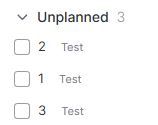
Would be good to have nested folders on the Calendar side dump bar since it allows tasks to be arranged by Topic/Domain. It would be cleaner than relying on the Tag feature that comes with Notes/Subtasks which becomes disorganised and is arranged out of order (see below on “Test”).
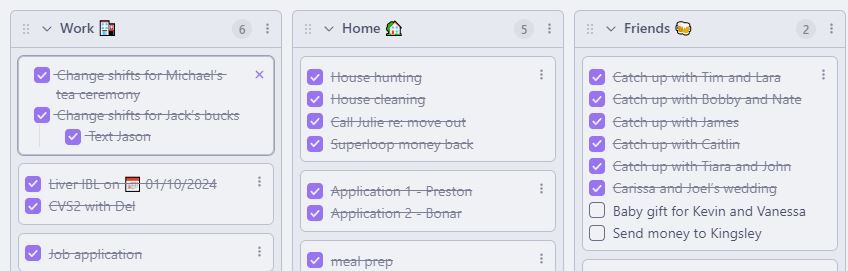
Have attached an example of my Kanban board from Obsidian which could be a way of organising these nested folders. They could be arranged vertically down the dump bar instead of horizontally as shown.
- Platforms
Comments5
Manos Mastorakis
Oct 14, 2025
Hi there, thanks for reaching out. This is Manos from Routine and I’m happy to take point on this.
Really interesting use case, thanks for taking the time to share such detailed feedback. At the moment, the Calendar tab is designed to have the sections such as “Overdue”, “Unplanned”, “Upcoming”. Adding your own custom sections/folders would help you customize your work in a way that matters to you.
I’m logging this as feedback and once a similar functionality is released you will be immediately notified!
All the best,
Manos @Routine
Jackson Hua
Oct 14, 2025
Thanks for all your replies, it is noted and appreciated!
A potential way to incorporate this would be a drop down menu in the Calendar task dump area where you can toggle between a “Time Based View” (that includes Overdue, Unplanned, Upcoming) and a “Task Based View” (that includes the Custom tasks/folders as I have suggested above).
There could also be some sort of Hybrid View where Unplanned tasks can be dragged and dropped into Custom tasks/folders which seems like the way you are heading. I do however find older tasks tend to become neglected and forgotten about if the default setting is time-based (Overdue, Unplanned, Upcoming).
Thanks for your hard work!
Manos Mastorakis
Oct 17, 2025
Thanks for the follow-up, really nice to hear more about this.
Or we can also have a filter that completely shows only what you’re lookin for, and even the ability to add custom filters with formulas, so you can find both custom as well as time based tasks. It’s a lot to think about and of course as mentioned before, we sincerely appreciate your input!
We’ll keep you posted if we implement similar functionality in a future update!
All the best,
Manos @Routine
An Anonymous User
Oct 18, 2025
Thanks! That sounds awesome and look forward to future updates.
Do you know if there are plans to sync the task bar from the calendar view with Inbox?
Currently, I am not using the Inbox view as much since it is not as practical in terms of dragging and dropping into the calendar, and there is no cohesion between that and the tasks from the calendar task bar. I am not sure if I am using it to its full potential though.
It could be good to have the Inbox view become the list of tasks with nested headings/tick boxes/filters that we have been discussing and having this be synced with the side task bar in Calendar.
Julien Quintard
Oct 20, 2025
Hi. The inbox will eventually be fully customizable so you can filter, sort and group as you want. See Canvases .