Customize allocation ✅ checkmark in calendar
Hi!
When I create a task through [ctrl]+[space] e.g. example test at 12:28, I get
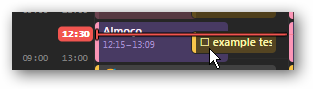
this at my calendar (I still use Notion calendar to plan my events). See the little square? It is a Routine task.
Now, if I complete the task through Routine, the calendar event remains with that square. But it has been done! Can you please provide a way to change it to a green checkmark ✅ to easily see it as «done»?
I can change the event title to ✅ example test like this
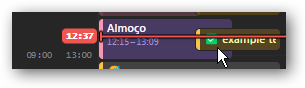
but when I return to Routine
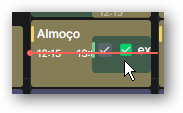
the done task has changed its name 😭 and a double checkmark is shown.
Thanks for reading.
Hope you can add this feature.
Best regards.
- Platforms
- Windows
Comments5
Julien Quintard
Feb 6, 2025
Thanks. We will consider making it customizable
Vkthor
Feb 10, 2025
Hi!
Thanks for your answer.
Maybe I didn't express myself correctly.
The point was not making the title task customizable.
Instead, every time a task is marked
donein Routine, automatically the white square🔳shown at the beginning of the respective allocated time at Google calendar event also
changes to a green checkmark
✅.I think this would be easy to implement and would be great.
Julien Quintard
Feb 11, 2025
Yes I understood it like this. This is why I renamed your post to “Customize allocation ✅ checkmark in calendar”. This is what you mean right?
Vkthor
Feb 11, 2025
Yes, yes. 😊
It was my fault. A bad interpretation of the word «allocation». Sorry.
Thanks a lot.
Julien Quintard
Feb 11, 2025
All good :) Thanks